Digital Asset Management
Automate your marketing asset lifecycle
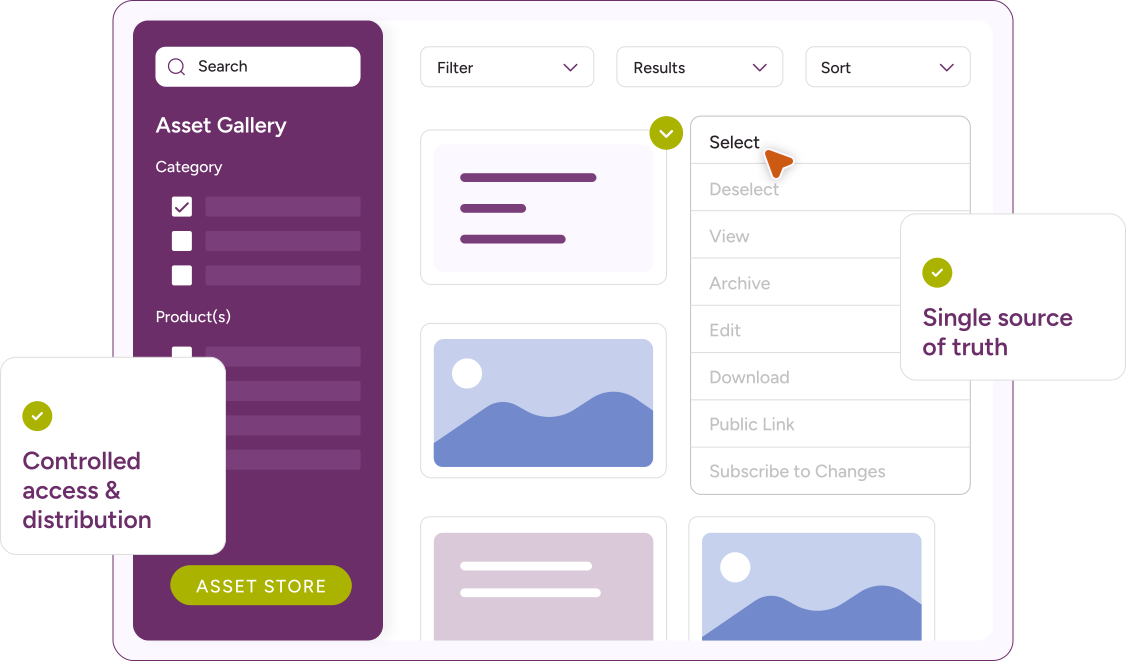
Your single source of truth
Use your central asset store to search, manage metadata and more
Finding the right asset quickly is only part of the task. Teams also need to know whether that asset is currently approved, what version it is and whether it remains valid for the product it relates to.
bethebrand’s central asset store lets teams search by keyword, metadata field, asset type, product area and review date. A file’s compliance context is visible before it is used.
Reduce cost and errors
bethebrand brings briefing, approval, distribution and asset creation into a single managed environment.
- Briefing and approval
- Automated reclassification of expired assets
- Simultaneous distribution to multiple channels
- Creative Automation
- Creative briefing and approval
- On-demand content generation
- Image reformatting and repurposing
- Alerts, notifications, and reporting
Manage user permissions and access
Different roles require different levels of access. Product teams need assets relevant to their area. External agencies need approved files. External auditors need to review records without the ability to alter them.
bethebrand’s permission controls are configured at user, team and asset level.
Usage rights management
Set specific asset rights, eg copyright restrictions
Connect systems using our API
Connect your asset store to other third-party applications
Asset lifecycle management for regulated content
Most marketing assets in regulated contexts have defined shelf lives. When that happens, the outdated version needs to be withdrawn before it reaches another campaign.
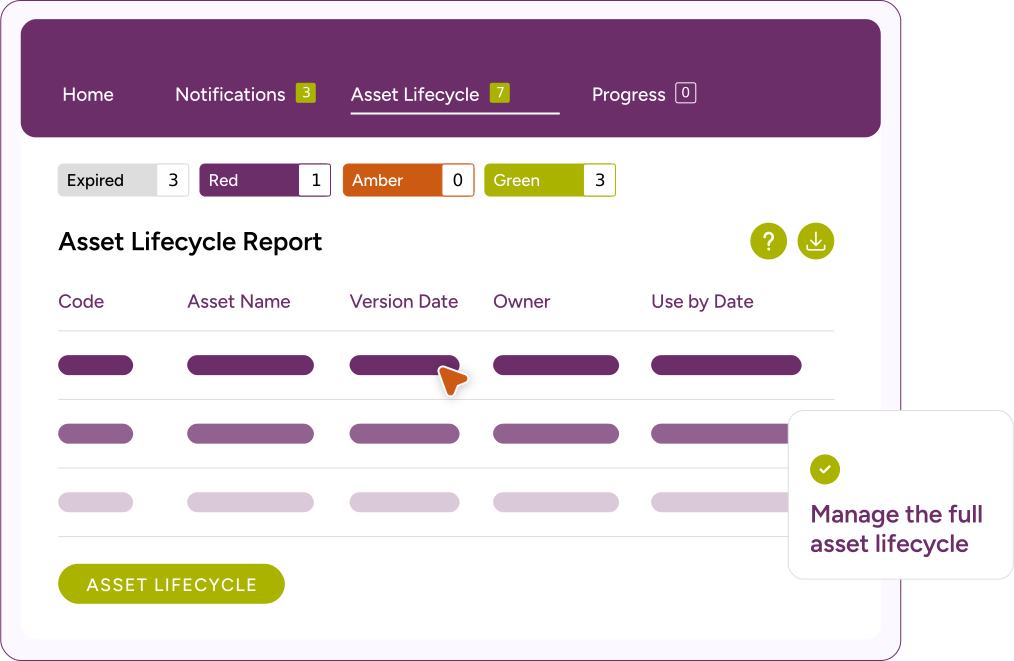
bethebrand manages the lifecycle of every asset from upload to archive. Assets can be assigned expiry and review dates at the point of upload. As those dates approach, the platform dashboard flags them and email alerts are sent to the responsible team. When an asset expires, it is reclassified automatically and removed from active use.
The full version history is retained throughout. Compliance teams can see every version of an asset, who approved it and when it was withdrawn. That record is generated within the workflow, not reconstructed after the fact.
Connect to approvals and workflow
Assets in bethebrand are not isolated files in a folder.
When an asset completes its review and sign-off cycle, its approved status is recorded directly in the DAM. Any team member who accesses the file can see its current approval status without switching to a separate system.
SeeDynamic adds another layer of automated content checks against the firm’s own predefined internal rules before assets reach formal compliance review. Issues are identified and resolved earlier in the process, which reduces errors and allows assets to be right first time.
Reporting and management information
bethebrand’s reporting suite gives teams and administrators a clear view of asset status across the library at any point in time.
The Asset Lifecycle Report groups all active assets by their current status, expired, approaching review or current, so teams can identify upcoming work and plan resources accordingly. The Expired Asset History Report maintains a permanent log of every asset that has passed its expiry date, including version details and dates.
Approval records are retained in full. The Approval Summary Report provides one line per approval task for every iteration of a workflow, giving compliance teams a comprehensive view of how each asset was reviewed and signed off.
Frequently asked questions
What is Digital Asset Management (DAM) for regulated firms?
Digital asset management (DAM) is a centralised platform for storing, organising and distributing marketing assets. For FCA-regulated firms, it needs to do more than store files.
Every asset used in a campaign needs to be current, approved and version-controlled. Using an outdated or unapproved version creates compliance exposure under financial promotions rules. A DAM removes that risk by making approval status visible at the point of access, removing expired content from active use automatically and retaining a complete audit record.
When a regulator or internal audit function asks for evidence of what was live at a given date, a well-implemented DAM produces that record immediately, without manual reconstruction.
How can I search for assets?
You can filter assets by client-defined metadata or search by keywords within metadata and the text of each asset. You can also filter by approval status and review date, so teams can confirm a file’s compliance context before use. Searches can be narrowed by asset type, product area or channel
How do I upload assets?
Assets can be uploaded individually, through workflows, or in bulk via multi-asset workflows. Bulk uploads are useful during platform migration or when managing large volumes of refreshed content, such as annual product disclosure updates across multiple product lines.
Can I restrict access to certain assets?
Yes, permissions can be configured so users only see assets they are authorised to view. Permissions in bethebrand are set at user, team and asset level.
Can I customise metadata fields?
Yes, you can define metadata fields such as dropdowns, free text, multi-select, date fields, and more. For regulated firms, common configurations include product area, approval status, review date, distribution channel and usage rights.
What file types are supported?
Virtually any file type, including Word, PDF, PowerPoint, Excel, images, videos, and audio files. Assets in multiple formats are stored and searched within the same platform, with metadata and approval status attached to each file regardless of type.
How do I manage asset lifecycle?
Assets have expiry/review dates, visible via dashboards and reports. Email alerts can be configured for upcoming reviews.
How does bethebrand's DAM support compliance with FCA financial promotions requirements?
bethebrand’s DAM maintains a complete record of every approved asset, including version history, named approvals and expiry dates. Outdated or withdrawn assets are automatically archived, preventing use in new campaigns.
This supports a firm’s ability to demonstrate compliance with financial promotions obligations under COBS and Consumer Duty, and to produce that evidence promptly when required by the FCA or an internal audit function. Evidence & Verification files can be uploaded and stored with assets to further enhance the audit record for assets
Can auditors or compliance teams access the asset library directly?
Yes. bethebrand supports configurable direct access for compliance teams and auditors. After a short orientation, auditors can independently search live and archived assets, review full approval trails and verify compliance records without requiring assistance from the marketing team. Access is permission-controlled, so auditors see only what is relevant to their review. The record they access is the same one generated during the approval process.
Proof not promises
Working with leading financial services teams
We’d definitely recommend bethebrand. The system is easy to use, it makes everything trackable and it helps people do their jobs with more confidence.
Hazel Phillips
Agria Pet Insurance
The bethebrand team took the time to understand exactly how we worked and what we needed from the platform. The implementation process was smooth, and they provided great support throughout.
Kirsty Igoe
Marketing Communications Manager, The Cambridge Building Society
Read more of our client stories
Our Client StoriesWithout bethebrand, I wouldn’t feel confident that we could meet our obligations as a regulated business.
Joanne Palmer
Head of Marketing, Police Mutual and Forces Mutual